Readable Markdown Output
Render headings, lists, emphasis, and rich text without bolting a separate docs stack onto the app.


Inline markdown for Vue and Quasar applications
Render Markdown in help panels, onboarding flows, docs surfaces, and compact content blocks without standing up a separate content renderer.
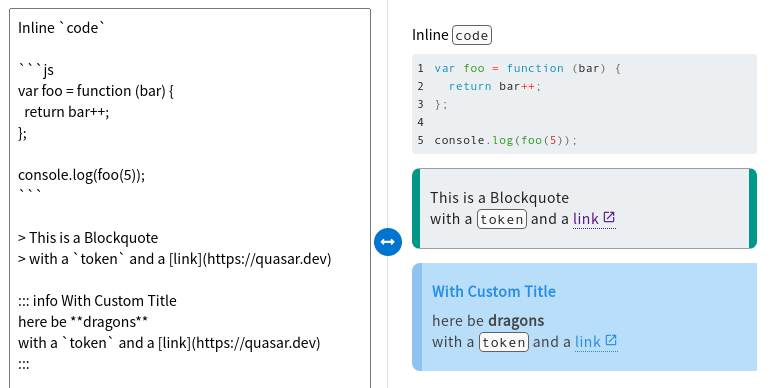
QMarkdown turns raw text into app-ready content with code fences, inline formatting, and documentation-friendly presentation that still feels native to a Quasar interface.
QMarkdown stays deliberately narrow: render Markdown cleanly, keep examples readable, and drop formatted content into interfaces without creating another content pipeline.
Render headings, lists, emphasis, and rich text without bolting a separate docs stack onto the app.
Present code blocks cleanly for setup guides, examples, snippets, and technical help content.
Use the same renderer for docs pages, side panels, onboarding screens, and embedded guidance.
Turn authored text into reusable product content instead of hand-formatting the same copy over and over.
Keep typography and surfaces aligned with Quasar layouts rather than dropping in a disconnected renderer.
Wire Markdown rendering into Vue and Quasar apps quickly when all you need is dependable display output.
This site runs on Q-Press and the shared md-plugins tooling, so QMarkdown's docs, examples, and navigation fit into the same family as the sibling Quasar UI projects.
The docs are structured to move quickly from installation into working usage patterns. If something feels off, GitHub Discussions and the repo issue tracker are still the best places to surface it.